
Ephemeral E2E Browser Testing
The Problem
Running Cypress or Playwright tests locally is painful. Your test suite either:
- Destroys your development database state (dropped tables, truncated records)
- Fights active ports causing cryptic connection refusals mid-test
- Requires manual reset scripts you have to remember to run before and after
The Solution: devx test ui
devx test ui boots an entirely clean, isolated topology just for your tests — fresh databases on random ports, completely separate from your active development environment. When the tests finish, everything is torn down automatically. Your dev DB is never touched.
devx test ui --command "npx playwright test"Configuration
CLI + YAML Parity: All options are configurable both via CLI flags and devx.yaml. Neither is a second-class citizen.
YAML Configuration (committed team defaults)
# devx.yaml
name: my-app

databases:
  - engine: postgres
  - engine: redis

test:
  ui:
    setup: "npm run db:migrate"    # Run before tests (migrations, seeds, etc.)
    command: "npx playwright test" # The test runner command
CLI Flags (one-off use, overrides YAML)
# Simplest form — reads everything from devx.yaml
devx test ui

# Override the test command inline
devx test ui --command "npx playwright test"

# Add a setup (migration) step
devx test ui --setup "npm run db:migrate" --command "npx playwright test"

# Pass arguments directly after --
devx test ui -- npx playwright test --reporter=html

# Use Docker instead of Podman
devx test ui --runtime docker --command "npx playwright test"
Architecture & Execution Flow
Below are the architectural component structure and the step-by-step execution flow of devx test ui.
Component Diagram (C4 Level 2)
Execution Lifecycle Flowchart
How It Works
- Generates a unique run ID (e.g.,
698e02) to namespace all ephemeral resources - Provisions isolated containers for each database in
devx.yaml, each bound to a random free port - Waits for readiness by polling container logs for the database startup marker
- Injects environment variables into the test process:
DATABASE_URL— the first database's connection string (primary)<ENGINE>_URL— per-engine URLs (e.g.,POSTGRES_URL,REDIS_URL)
- Runs
setup(e.g., migrations) with the injected environment - Runs the test command
- Tears down all containers and volumes unconditionally on exit — whether tests pass, fail, or crash
Environment Variables Injected
| Variable | Example Value | Description |
|---|---|---|
DATABASE_URL | postgresql://devx:devx@localhost:59785/devx | Primary database connection |
POSTGRES_URL | postgresql://devx:devx@localhost:59785/devx | PostgreSQL-specific URL |
REDIS_URL | redis://localhost:59822 | Redis-specific URL |
Verification Proof
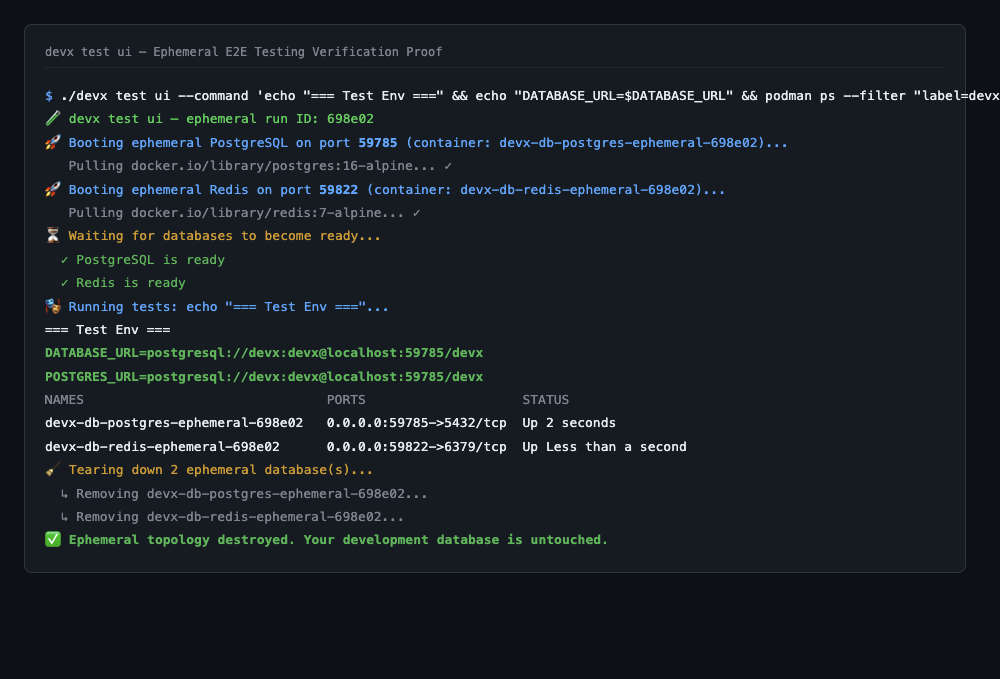
The test run below demonstrates a full lifecycle: two fresh databases are booted on dynamic ports, the test receives the correct injected DATABASE_URL, and both containers are destroyed cleanly on exit — the primary development database remains completely untouched.
Pre-processing
The setup step is designed for idempotent migration commands like npm run prisma db push or npm run db:migrate. These same steps should mirror your deployment pipeline to shift pre-processing validation left and catch issues early.
Single engine instance per type
devx test ui currently provisions one ephemeral container per engine type (mirroring devx db spawn). Multi-instance support (e.g. two separate Postgres databases) is a future enhancement.